Settings For Managing Vacations
How to input needed data to start using the Time Off feature
Written By Christopher Scott
Last updated Over 1 year ago
Inspectors and Office Team
1. Vacation Days and Carryover Days:
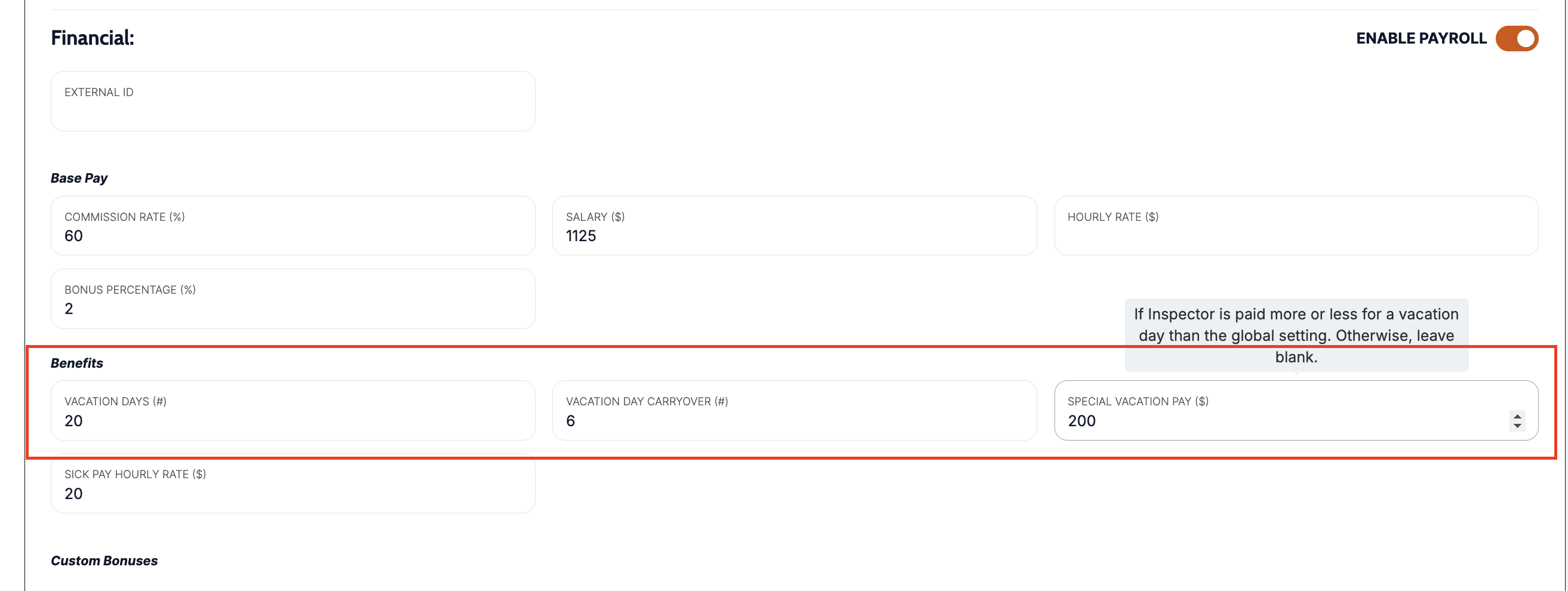
Each inspector and office staff member has optional individual vacation settings, which include vacation days and carryover days. These are set under the individual settings pages for inspectors and office staff.
The vacation days represent the total number of days an employee is entitled to take off in a year.
Carryover days are the unused vacation days from the previous year that can be carried over to the current year.
Vacation Pay:
Vacation pay is calculated based on the employee's vacation pay and the number of vacation days they have and use. This can be managed through the individual employee settings BUT it will default to the number set within the payroll settings.
These numbers are used in the payroll calculation and can be seen on the payroll report. Payment is limited if the employee runs out of vacation days. This means an employee can request time off longer than the amount of days they have, but will only be paid for the remaining days.
Example: Joe has 3 vacation days left. He requested M-F off and requested paid vacation. He will be paid for Mon, Tues, Wed, but not Thurs, Fri.
Vacation Pay and Payroll
Global Vacation Settings:
The Payroll Settings page allows for the configuration of global vacation settings that apply to all employees. This includes default vacation days, carryover policies, and vacation pay calculations.
These settings ensure consistency across the organization and can be overridden by individual settings if necessary.
You can also turn on notifications so employees receive emails that their vacation requests are approved, and admins receive notifications when employees request time off.
Integration with Time-Off:
The global settings in payroll settings are used to calculate and manage vacation.
Payroll is calculated and includes vacation calculation.
Vacations can be removed on the individual payroll page if needed.
Time-Off
View Time Off Dashboard Overview to learn more about this feature
1. Time-Off Requests:
2. Tracking and Approval:
3. Vacation Day Calculation:
Summary
The integration of vacation settings across inspectors, office, and payroll ensures a cohesive approach to managing employee time off. The time-off feature leverages these settings to provide a streamlined process for requesting, approving, and tracking vacation days, ensuring that both employees and administrators have clear visibility into vacation usage and entitlements.