Revert to Pending for Reports
Written By Ryan Wagner
Last updated 8 months ago
What it is
A way to move a completed inspection report back to pending. Use it when a report was marked complete by mistake or needs more work. The report’s status becomes “pending” again and the completed date is cleared.
Where to find it
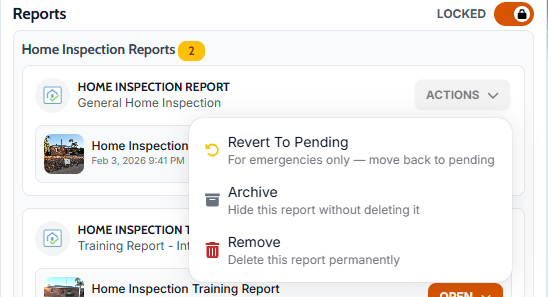
On the inspection (job) page, open the Reports section. For any report whose status is Completed, open the Actions menu (dropdown) on that report’s card. “Revert to Pending” appears there when the report is completed.
How to use it
Open the inspection and go to the Reports section.
Find the report that is currently completed.
Open the Actions dropdown on that report.
Choose “Revert to Pending.”
The report status changes to pending and the completed date is cleared. You can edit or complete it again when ready.
Tips
Use this only when necessary (e.g. wrong completion or rework). The action is intended for corrections, not routine workflow.