Linking Your Spectora Services In Attik
A strong link between Attik services and Spectora services is needed if you are using webhooks.
Written By Christopher Scott
Last updated Over 1 year ago
Once you've connected your Spectora staff to Attik, the next important step is to link your Spectora services. This ensures that inspection data coming from Spectora is properly matched with the correct service types in Attik. Doing so enables accurate payroll tracking, proper scheduling, and clean data synchronization in both directions.
Why Linking Services Matters
When an inspection is pushed from Spectora to Attik, the charges on the inspection must be matched with specific services in Attik.
This allows you to assign different pay types and rates to different services during payroll processing.
When scheduling from Attik, the linked services help ensure that the correct service is created in Spectora with the expected formatting.
Understanding Service Structure Differences
There are a few key differences in how services are organized between Spectora and Attik:
Spectora has a hierarchy: primary services and add-ons.
Attik, on the other hand, keeps all services in a single list, categorized by type (Primary, Add-On, etc.).
Because of this difference:
You can link multiple Spectora services (including different variations of the same add-on) to a single service in Attik.
For example, if you have "Radon Testing" listed under each primary service in Spectora, you can link all of those to one unified Radon Testing service in Attik.
How to Link Services
Go to your Spectora Integration page in Attik.
Find the Spectora service you want to link. If it's not already linked, you'll have two options:
Create a new service in Attik
Link to an existing service
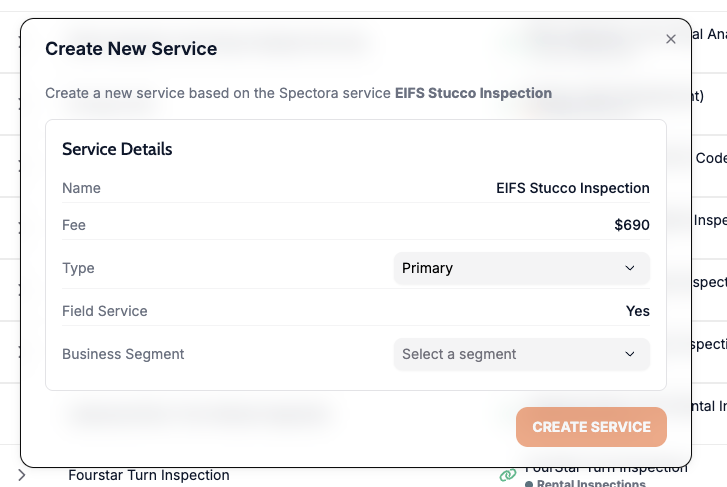
Creating a New Service:
Select "Create New Service".
Choose the type (Primary, Add-On, etc.).
Assign a business segment (this acts as a category).
Click "Create".
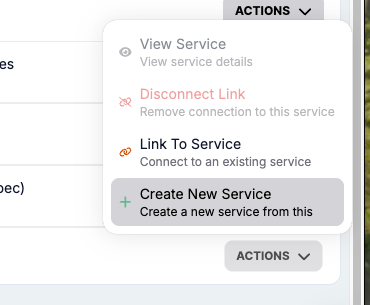
Linking to an Existing Service:
Click "Link to Service".
Attik will suggest matches, or you can search manually.
Find and select the appropriate Attik service.
Click "Link".
You can also disconnect a link if needed, and start over.
Visualizing the Mapping
Attik shows you a list that mimics your Spectora service list, including both primary and add-on services. This makes it easy to:
See which services are already linked
Match groups of Spectora services to a single Attik service
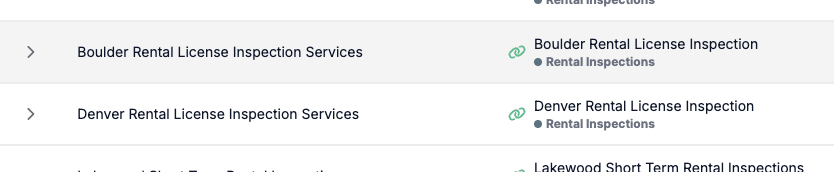
For example:
You may have multiple instances of "Radon Testing" under different Spectora primary services.
In Attik, these can all be mapped to a single Radon Testing service.
To confirm, navigate to Services > [Service Name] in Attik, and you'll see a list of linked Spectora services by their unique IDs.
Best Practices
Go down the list and ensure every active Spectora service has a link icon in Attik.
This ensures accurate payroll processing and proper data handling for scheduling.
You can add or adjust links at any time.
Need Help?
Refer to our video walkthrough on linking services.
Reach out to our support team if you need assistance.
Properly linking services ensures your integrations remain clean, predictable, and accurate across both platforms.